Square is a name almost every studio already knows, from the card reader on the counter to Square Appointments for booking. Turnexify is built around your own website and brand, and it can take payments through Square. So this is less "one or the other" than you might think. Here is how they compare on September 27, 2026. Prices move, so look at both pricing pages before you decide.
The one real difference
Square is a payments company first: the register, the card readers, the bank account, and a booking tool that grew out of them.
Turnexify is your place online first: a full website on your address, in English and Spanish, with booking on every page and tools for showing your work. For the money, it connects to your own Square or Stripe account.
That means you can use both. Keep Square at the desk, and let Turnexify run your site and your bookings, with online deposits landing in the same Square account.
Side by side
| Turnexify | Square Appointments | |
|---|---|---|
| To start | Free plan, then Pro $49/mo | Square Free, then Plus $49/mo per location |
| Card payments | Your own Square or Stripe account | Square |
| No-show fees and card on file | On Pro | On Plus |
| Website | Full site, templates and themes | Square Online site builder |
| Own domain | On Pro | On Plus |
| English and Spanish | Your pages, services, and emails in both | Page follows the device; your text in one language |
| Promo codes at online booking | On Pro | Not available, per its community forum |
| Links page with QR code | Every plan | QR code yes; bio page through Linktree |
| Book from a portfolio photo | Book This Look, on Pro | Not found |
| Branded story and post images | Share studio, on Pro | Not found |
| Classes | Courses, on Pro | On Plus |
| Card readers and POS | Use Square for these | Yes |
What you pay
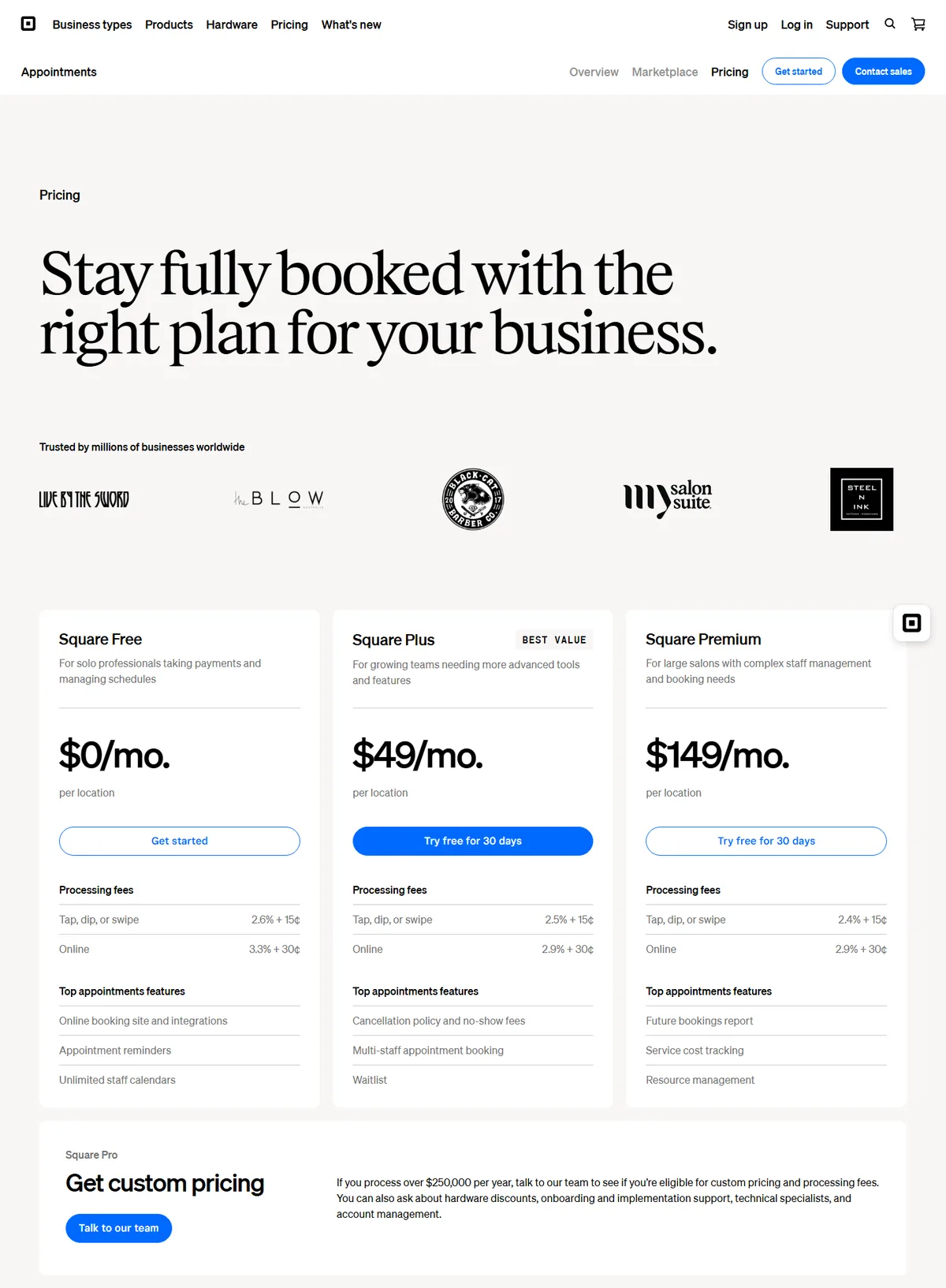
Square now sells one set of plans across its products: Square Free at $0, Square Plus at $49 per location a month, and Square Premium at $149 per location, with a 30-day trial on the paid plans. Card rates go down as the plan goes up: in person from 2.6% + 15¢ on Free to 2.4% + 15¢ on Premium, and online from 3.3% + 30¢ on Free to 2.9% + 30¢ on Plus and Premium. Charging a card on file is 3.5% + 15¢.
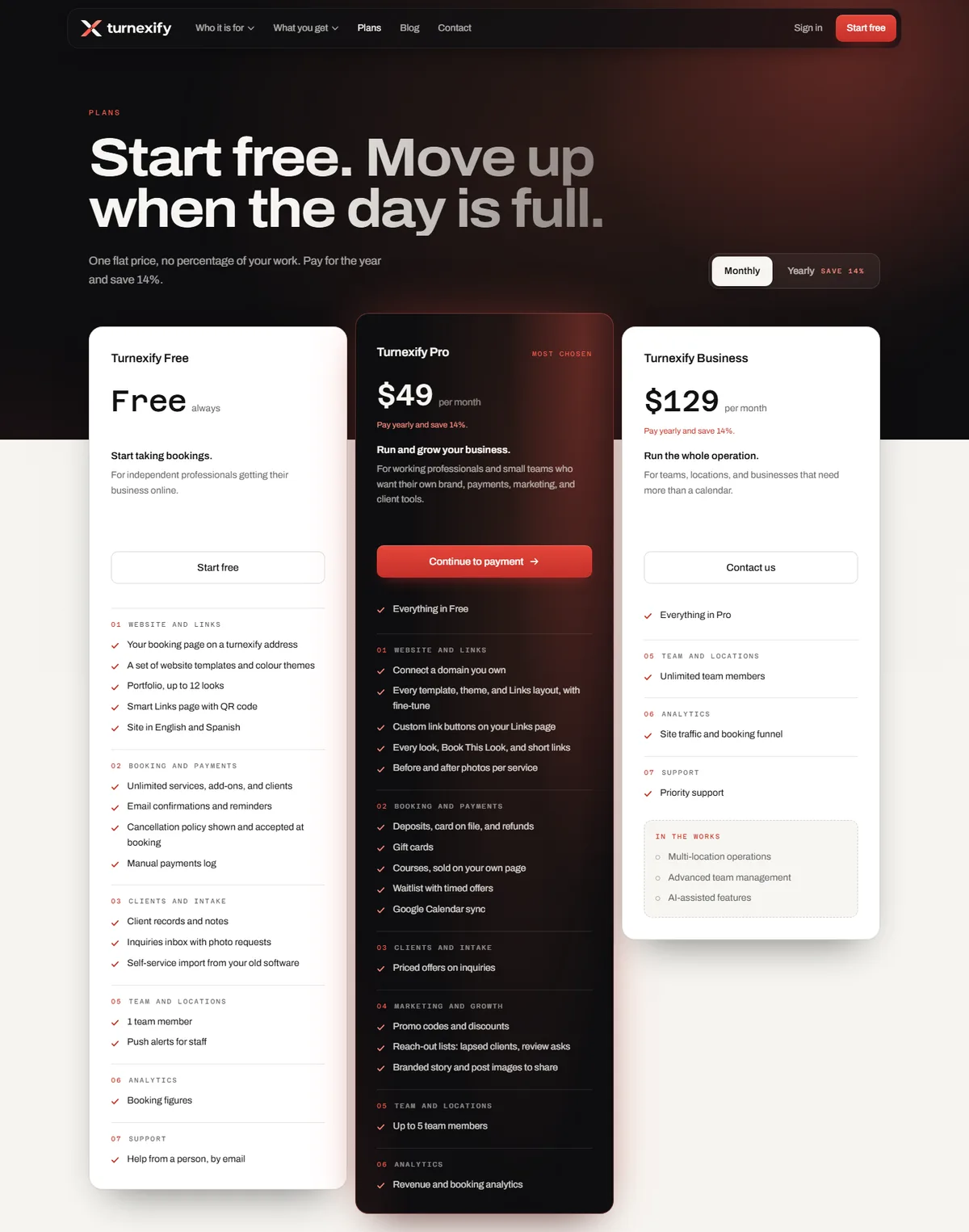
Turnexify has a Free plan that stays free, Pro at $49 a month, and Business at $129, with 14% off paid yearly. Card fees are your processor's own: connect Square, and you pay Square's rates, with nothing added by us.
Protecting your time
Both take deposits and keep a card on file for no-shows. On Square, the cancellation policy and no-show fees come with Plus. On Turnexify, they come with Pro, and the exact sentence the client agreed to is saved with the booking. A fee is never more than the visit, and a client who cancels late from their link is charged right then.
Your site, your address, your language
Square includes a website builder with a booking page, and a custom domain on Plus. You shape the colours, layout, fonts, and pages.
Turnexify builds a full site for a booking business: home, services, portfolio, team, about, reviews, and contact, each with booking built in, from templates and themes you choose. On Pro it lives on your domain.
Language is where they differ most. Square's booking page follows the visitor's device language, but your service names and client notifications stay in the one language you write them in. On Turnexify, you write your services and policies in English and Spanish, and each client sees your site, books, and gets their emails in their own language.
Made for showing your work
These come with Turnexify. We checked Square's own pages for each.
- A Links page for your bio. One link for Instagram or TikTok, with your booking button first, your next opening, your work, and every way to reach you, plus a QR code in your colours. On every plan. Square offers a booking QR code, and points to Linktree for a bio page.
- Book This Look. A portfolio photo becomes something to book: the look, its service and extras, one price, and a short link that counts opens and bookings. On Pro.
- The share studio. Turn a look, a service, or a before and after into a story, post, or square image with your logo and your booking line. On Pro.
- Before and afters on your site. A slider on your service and portfolio pages, shown only with the client's consent. On Pro.
- Promotions clients can use online. Discounts that apply on the days and hours you pick, and codes the client types while booking. On Pro. On Square, discounts are applied in the app, not typed by the client at online booking.
Strengths and trade-offs
Turnexify
Pros
- A Free plan with no end date
- Works with your Square account, or Stripe, with no percentage taken
- A full website for a booking business, on your own domain
- English and Spanish for your pages, services, and emails
- Links page, Book This Look, share studio, before and afters, and online promo codes
Cons
- No card readers or register of its own: use Square for the desk
- No consumer marketplace app
- No marketing texts: reminders and messages go by email
Square Appointments
Pros
- A real free plan, and payments, hardware, and banking in one place
- Lower in-person card rates on the paid plans
- Marketing, loyalty, and staff tools on Plus
- Square Go and Reserve with Google for being found
Cons
- No-show fees and card holds need Plus
- No promo codes at online booking
- Service text and notifications in one language
- Priced per location
Pick by how your day runs
If your day runs on the register, with hardware, banking, and staff tools in one system, Square Appointments is built for that.
If your day runs on your own site and your bookings, in two languages, with your work front and centre, Turnexify is built for that. And if you love Square at the desk, you do not have to give it up: connect it, and Turnexify's online payments land in the same account.
Moving over
Turnexify can import your clients, appointments, and gift cards from Square. You connect your Square account for payments from the Payments page in your dashboard.
Ready to put this to work?
Plans